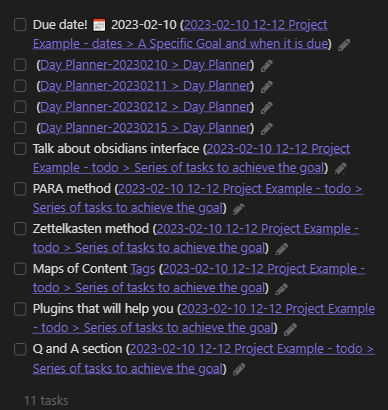
this is a screenshot of the default appearance of task block links. They look a bit messy, so this is a good example of a place to use custom CSS styles. This work has already been done by a community member so we just need to put the file in our CSS snippets folder and check the box to enable it in settings
note that in the web view of this vault task queries will not be rendered. However the query blocks can still be used as a reference.
fixing old format styling for Tasks
tasks CSS ← external link
here we have the css that turns the links into icons! Much cleaner
anyname.css file goes
we can add custom statuses as well (depends on chosen theme)
We can also use tags to create different views that will visualize our tasks in multiple ways. By category, using tags - by due date/start date/ etc. - by progress status .
group by tags
group by tags
sort by due
and we can filter this way
(tags include #task/🧹) OR (tags include #task/chore)
(tags include #task/🧹) OR (tags include #task/chore)The documentation has a cheat sheet for what you can do
- also a fun idea - create your own reward system for completing tasks